<
Termux Command Hub
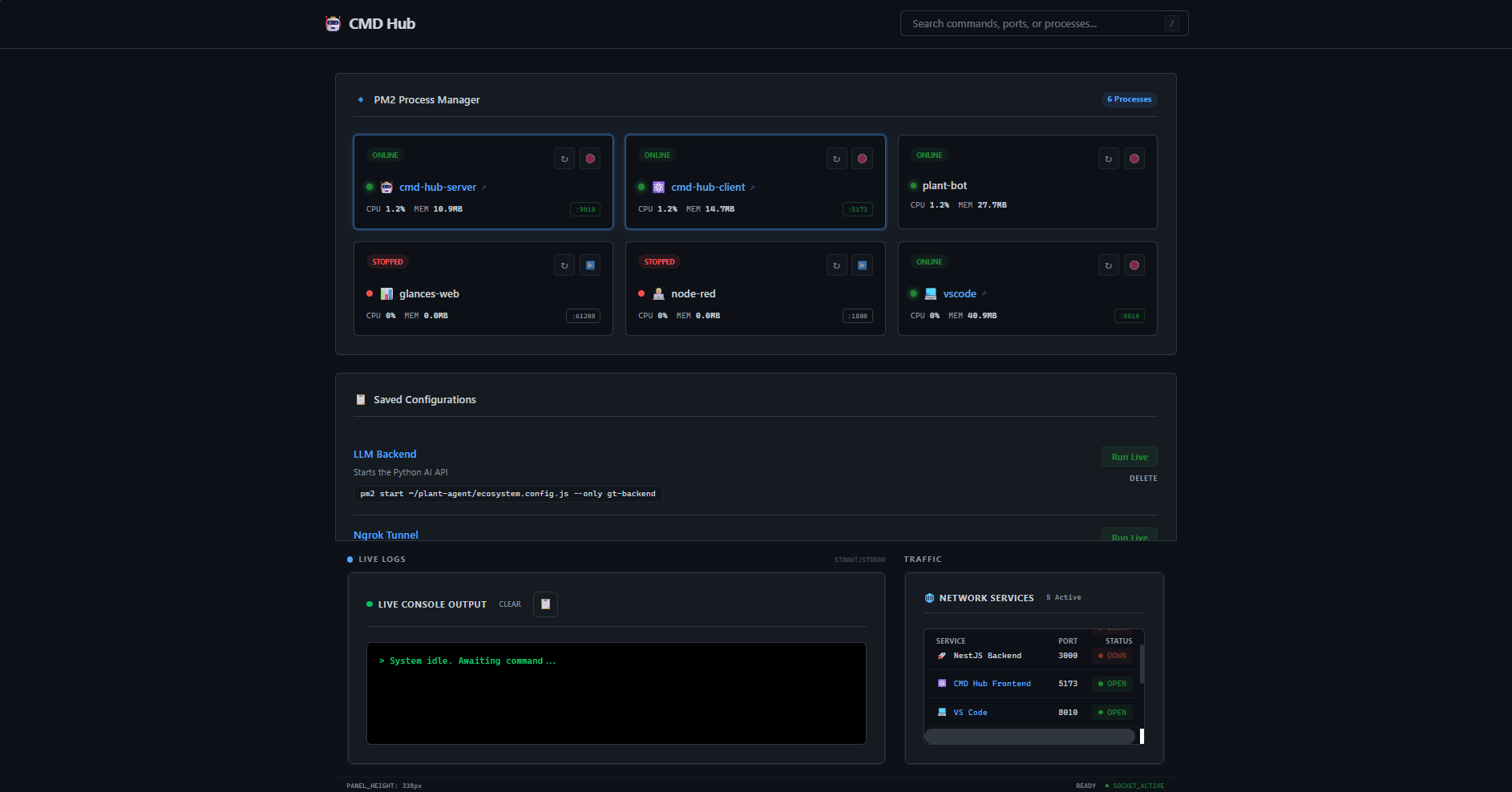
Termux is a terminal emulator for Android that allows users to run a Linux environment on their mobile devices. This makes possibleto make an old smartphone a home server but managing processes remotely can be challenging.
The application allows users to start, stop, and monitor termux commands remotely through a user-friendly web interface.
Since Docker is not natively supported on Android, PM2 is used as a process manager to keep commands running in the background and restart them if they crash.
Nest JS
Vite JS
PM2
TypeScript
TailwindCSS
Termux
Fullstack Development
Process Management
WebSockets
🤖 CMD Hub: Termux Process Manager
A high-performance, full-stack dashboard built to manage automation scripts and system processes directly from your Android device.
🏗️ Architecture
- Backend: NestJS (Node.js framework) - Running on Port 9090
- Frontend: Vite + Tailwind CSS - Running on Port 5050
- Orchestration: PM2 (Process Manager 2)
- Environment: Optimized for Termux / Android
🚀 Quick Start
Ensure you are in the project root directory, then grant execution permissions to the launcher and run it:
chmod +x launch.sh
./launch.sh
What does the launch script do?
- Installs Dependencies: Runs npm install for both Client and Server.
- Builds Assets: Compiles NestJS into /dist and Vite into static assets.
- PM2 Integration: Checks for PM2, installs it if missing, and initializes the ecosystem.config.cjs.
- Process Management: Clears old instances to prevent port conflicts and starts the fresh production build.
🛠️ Project Structure
├── client/                 # Vite + Tailwind v4 source
├── server/                 # NestJS Backend source
├── launch.sh               # Master build & deploy script
└── ecosystem.config.cjs    # PM2 process configuration
📊 Management Commands
Once the hub is running, use these standard PM2 commands to monitor your system:
| Task | Command |
|---|---|
| Check Status | pm2 status |
| View Live Logs | pm2 logs |
| Monitor Resources | pm2 monit |
| Stop Everything | pm2 stop all |
| Restart Hub | pm2 restart ecosystem.config.cjs |
🌐 Network Configuration
By default, the services are mapped as follows:
- Dashboard UI: http://localhost:5050
- API Gateway: http://localhost:9090
[!TIP] To access this dashboard from another device on the same Wi-Fi, replace localhost with your phone's internal IP (found via 'ip addr show' in Termux).
⚠️ Requirements & Troubleshooting
Node.js: Ensure nodejs-lts is installed via 'pkg install nodejs-lts'.
Storage: This project requires approximately 400MB of space for node_modules.
Port Conflicts: If a build fails, run pm2 kill and try again.
ML-Powered Suggestions
How it works:
I use a MiniLM-L6 transformer model to turn project descriptions into mathematical vectors.
By calculating the Cosine Similarity between these vectors, the model identifies semantically related work.
Analyzing project similarities...